Showing posts with label Google Drive. Show all posts

Monday, May 20, 2013

Historical Fiction Book Club Unit: Part 3


This month, students have been working hard in their historical fiction book clubs to read, think, write, and talk deeply about their historical fiction books.  They have been creating charts and using a variety of note-taking strategies to help them prepare for their book club conversations that they have on Mondays, Wednesdays, and Fridays.  Students choose whether to write their thinking on post-its, in their reader's notebook or book club notebook, or use Google Drive to help them deepen their thinking and prepare for their conversations.  

Below are some examples of the work students have been doing in their notebooks and on Google Drive to prepare for their conversations:

Bulletin Board where students post examples from their notebook 
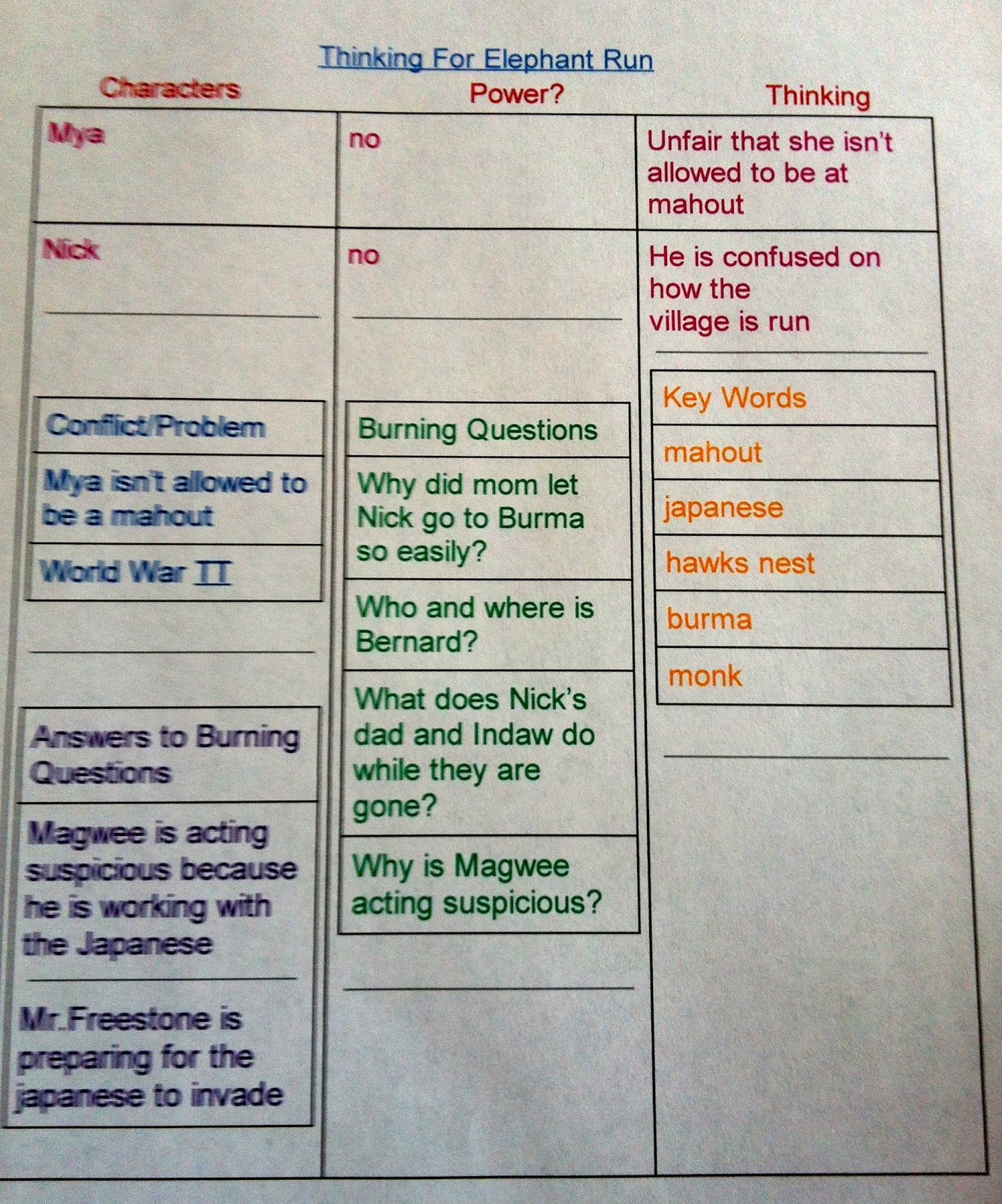
Example of how one student used Google Drive to create a chart 
Another example of how one student used Google Drive to create a chart
Example of a chart created on Google Drive 
Example of a chart created on Google Drive


Example of a plan one student created in preparation for conversation
   

Have a great week! :)


Wednesday, May 1, 2013

Our Poetry Celebration and Students' Poetry Books

Last week, we had our class celebration to culminate our poetry unit.  We invited parents and family members to the cafeteria so students could spread out in small groups to share their poetry books with their audience.  During this unit, I always give each student a hard cover poetry book from Bare Books to create their very own poetry book with all the components of a published book: title, title page, dedication, table of contents, poems, illustrations/photos, about the author, and end pages.  The students were so excited to create their very own hard cover poetry book!  Students continued to use Google Drive during our poetry unit to type up their poems, share them, and get feedback just like they have been doing in all of our writing units.  After writing many poems, they began the decision making process of which poems they loved and wanted to publish in their book. Once they selected poems, they decided how to best illustrate the poems with either their own drawings or photos. Then the book-making process began!


Below are examples from some of the students' published poetry books: 
Examples of Poetry Book Covers and Titles
Examples of Back Covers of Poetry Books


Example of Title Page
Example of Table of Contents 

Another Example of Table of Contents


Happy Writing and Celebrating! :)


Saturday, March 23, 2013

Using Google Drive in Book Clubs: Part Two


My students have been using Google Drive in their book clubs in many ways. They have been using it to:  
  • plan out their reading on a calendar to keep track of which chapter to read for each conversation date (book clubs meet every Monday, Wednesday, and Friday).  By creating the calendar on Google Drive, book clubs can access it from anywhere to see what they need to read for the next conversation, without having to worry about losing the paper calendar or forgetting it at school.  
  • create a book club contract to agree on their responsibilities as a book club, what to bring to each conversation, and what the consequences will be if they are not prepared.  By creating the contract on Google Drive, students can access it from anywhere to be reminded of consequences if they aren't prepared and also have the reminders of what to bring with them to each conversation so they are prepared.  
  • prepare for their next conversation by jotting down their thinking, ideas they want to bring to the conversation, and text evidence they have collected to support their ideas.  Some students are still choosing to use their book club notebook to jot down their ideas and create charts to prepare for their conversations, while others are using a combination of both.  
  • record notes from each conversation by noting what idea they focused their conversation on, what evidence they talked about, and what they would like to continue talking about for their next conversation.  Book clubs that are choosing to use Google Drive to record parts of their conversations, are bringing a laptop to each conversation and taking turns typing the information.  Since I am only one person and can't be in five places at once, this is great for me because I can see what each club talked about even if I didn't get a chance to physically be with that club that day.  It is also great for book clubs because they can continue to refer to their past conversations so they are piggybacking onto their ideas and can see how their thinking is evolving.  
To see examples of how they are using Google Drive in these ways, please see the photos below.  I apologize in advance for the blurriness, but I took the photos from the computer so it doesn't always come out clear that way.  I will continue to share ways they are using Google Drive in their book club conversations so stay tuned! 


Book Club Calendar to keep track of which chapters to read for the next conversation

Book Club Contact book clubs completed to agree on responsibilities 
Example of how one book club is keeping track of the focus of each conversation

Another example of how a book club is keeping track of the focus of each conversation

Example of how one student is preparing for conversation 

Another example of how one student is preparing for the next conversation 
I would love to hear about other ways you are using or have used Google Drive for book clubs in your classrooms, so please share!

Thursday, March 21, 2013

Social Issues Book Club Unit

Currently, we are in our social issues unit in reading workshop (one of my favorite units!) and students are in book clubs.  Last week, to launch the unit, we discussed the purpose of the social issues unit and students brainstormed why they think we have a social issues unit.  As students shared their ideas and opinions about the purpose, I jotted them down on the chart below.  I always launch units by having this type of conversation with the students because I believe it is so important for students to know and understand the WHY behind our units and lessons.  

This is our first book club unit of the year so we also brainstormed and discussed the purpose of book clubs.  Students have been participating in book clubs since 3rd grade so they come to 5th grade with book club experience.  Below is a chart we created as a class to list students' ideas about preparing for and having a successful book club conversation.  


So far in the unit, we have been learning how to use specific lenses to deepen our thinking about the social issues our characters are dealing with in our books. For example, reading with the lens of fairness - what is fair or unfair in this text? Or reading with the lens of acceptance - who is accepted or rejected in this text and why? Or reading with the lens of power - who has power and who doesn't? Whose voice is being heard and whose isn't?  Below is a chart listing our mini-lesson teaching points so far for this unit.  Students have been applying these teaching points in the social issue books they have chosen to read with their book clubs and we are also applying them as a class in our read alouds.  

Stay tuned to hear more about our thinking and learning in our social issues unit! :)

Tuesday, March 19, 2013

Using Google Drive for Book Clubs

Since we have been embracing Google Drive this year in our classroom and trying to use it in as many ways as possible, I decided to try using it for book clubs too.

Last week, my students were grouped into book clubs and they selected at least three social issue books, during our book pass, that they were interested in reading during this unit.  Usually, the next step is for each book club to complete a "book club contract" and fill out a calendar of how many pages/chapters they will read for each conversation day (Monday, Wednesday, and Friday).  These documents are usually on paper and then we have to make photocopies so each member as all the information and that they put them in a safe place so they don't lose them (which some still do...).

Yesterday, I ventured into using Google Drive for these documents instead and it was fabulous!  I uploaded the documents to Google Drive and shared them with the whole class.  During reading workshop, each book club had one laptop and went onto Google Drive to complete the contract and set up their calendars for their first two books. They shared these documents with one another and with me.  Now students can access their calendars and any other planning sheets for their book club conversations at home without having to worry about forgetting it at school or misplacing them - why didn't I think of this sooner for book clubs!

Most book clubs decided yesterday that they will have one laptop available during their conversations to use Google Drive - stay tuned to hear how they are going to use it!

I would love to hear how others are using Google Drive with students during book clubs so please share!  Stay tuned to hear more about how we are using Google Drive during our book club units.


Thursday, January 31, 2013

Ways we are Using Google Drive in our Classroom


A couple months ago, my students began using Google Drive and it has transformed the way we work in our classroom.  I keep asking myself, why didn't I set them up with Google Drive sooner??  It has lifted the level of motivation and collaboration among students.

Here are some of the many ways we are using Google Drive in our classroom so far:

  • Writing Workshop: We are planning and drafting on Google Drive by using laptops daily. Since we are using Google Drive for our writing pieces, students are able to share their writing with writing partners and other classmates they want feedback from to help them as a writer.  They also share their writing with me each day so I can leave comments and read their writing daily to help inform my future instruction.  I have noticed that since students are able to view my comments on their classmates' writing, their own comments and the feedback they give their writing partners has greatly improved.  
  • Writing Workshop:  As part of our current literary essay unit, we wrote a class literary essay using Google Drive.  The students loved being able to all work on one document at the same time and co-author it together - it was so cool to hear their excitement about the experience! 
  • Reading Workshop: At the end of each chapter book read aloud, we always have a whole class conversation and I type up the transcript of their conversation on the Smartboard so they can build upon one another's thinking and can work on lifting the level of their interpretation.  One of my students had the great idea this week to type the conversation in Google Drive instead of a word document so we can continue the conversation at home and during the week - it was an awesome idea!  The students were so excited to be able to keep the conversation going - yay! 
  • Writing and Reading Workshop: I share different documents with the students during workshop teaching such as mentor texts, lists of thinking stems, planning sheets, and so on.  This week, I set up a group on Google Drive that includes all of my students so now I'm able to easily share documents with the whole class with one push of a button.  The students actually asked me to begin sharing these documents with them via Google Drive so they can have access to them whenever they need them and not have to worry about whether or not they left it at school or have misplace it.  
Stay tuned to hear more about how we are using Google Drive as learners in our classroom! 

Thursday, December 13, 2012

Using Google Drive with Students


Last week, each student in my class set up their own Google Drive account - thank you Bryan! :) The students were beyond thrilled to get started using their Google Drive and loved the idea of being able to share writing with one another and me whenever they want someone to see their work or want feedback.  They were super excited to find out that they can work on the same document at once with someone else - perfect timing for our mini-research clubs in nonfiction!

First, each student created a folder labeled "______'s Portfolio" and then created sub-folders within their portfolio for each subject area.  Then they shared their portfolio with me so I can have easy access to all of their work from anywhere...school, home, and on-the-go using iPad/iPhone.  Students started using their Google Drive this week when we started our nonfiction research in reading and writing workshop.  Students are sharing their notes, summaries, research plan, sources, and so on with one another as well as leaving comments for one another and working on documents together - it is awesome!  I love being able to see what they are working on and even while they are in the process of typing and talking with one another about their research - I get to see their collaboration in action and it is powerful.


Here are some comments from students about using Google Drive:
  • "It's great to share notes with my research group and comment with one another at home."
  • "It's easier than working alone and then consulting when we get back to school because you can both work on the same document at the same time and look at each other's work and revisions."
  • "It's easier to save and share documents because you don't have to worry about forgetting your flashdrive and it autosaves for you while you work."
  • "It's convenient because you can continue to work with partners and group at home without having to be in the same place."
Stay tuned to hear more about how we are using and loving Google Drive! :)